- Home
- Products and Solutions
- Marking
- Industrial Inkjet Printers
- Gravis UX Series


Gravis UX Series
Maintainability and environmental performance have dramatically improved.
A human-friendly and environmentally-friendly IJ printer is here.
Introduction video
The Hitachi industrial IJ printer Gravis UX Series is a line of globally compatible products that have evolved not only in safety and ease of use but also in eco-friendly performance
Application Examples
For small characters


For high-speed printing

For larger small-size characters


For micro characters


Features
Three features of the Gravis UX Series with dramatically improved maintainability and environmental performance


The ink recovery control and device temperature control provided by the new technology “Makeup fluid consumption reduction system” significantly suppresses the amount of solvent volatilized. The amount of makeup fluid consumed has been reduced by up to 50%*1, the highest level in the industry. It contributes to reduced running cost and improved environmental performance.
- Comparison between our former models and UX-E. Data for 1067K ink at 20°C under in-house measurement conditions.


There is no need to stop the production line to replace the cartridges. Simple cartridge-type bottles provide an eco-friendly system that allows replacement after the ink or makeup fluid has been used up and the bottles are easy to dispose of.


IC tags are adopted for the ink and makeup fluid cartridges.
Installation of an incorrect cartridge can be prevented simply by
passing the cartridge over the reader, which is equipped with an
RFID (radio-frequency identification) function.
(A message
appears on the screen if an incorrect cartridge is scanned)


Automatic cleaning starts with one press of a button. There is no need to wait for its completion since the power turns off automatically when it is finished. Even if the nozzle gets clogged, it can be easily restored by the nozzle backwash function that sucks the fluid through the nozzle for cleaning, which is opposite of the normal ink ejection.


A new readily-understandable screen design is adopted for intuitive operations. Most of the operations can be completed on one screen with a simplified and well-arranged design. Complicated operations are not required to obtain the necessary information, which has improved usability.


With IC cards, login information and print data can be managed. * IC cards are optional.
User login
By scanning an IC card, only the registered user can log in and the range of operations permitted can be restricted by each card. It prevents any incorrect operation.
Print data selection
By scanning an IC card, the registered print data can be accurately called up. It prevents incorrect data from being called up, which may happen with manual operation.

Configuration of an IoT system can be smoothly achieved using simple wiring because of the standard Ethernet feature and open network compatibility. By collectively managing multiple devices from the host system, the information gathering and operations become more efficient.
- IoT: Stands for Internet of Things.

Specification
Optional features
Optional software features
- Integration with print verification system (Gravis MC-20S)
- Barcode reader connection function
- Special communication and external signal functions
Optional hardware
- 6M head cable
- L-shaped head
Separate panel
Offering incredibly flexible installation layout
Further improves ease of installation while retaining the Hitachi industrial IJ printer Gravis UX Series concept of being “safe,” “easy to use,” and “eco-friendly.”
Compatible models
- For small characters: UX-D360J/D660J/E660J
- For high-speed printing: UX-D450J
- For pigmented ink: UX-P660J
- For larger small-size characters: UX-D410J
- For micro characters: UX-D440J

Flexibility in installation of the main unit and operation panel improved by separating the operation panel from the main unit
The main unit and operation panel can be installed at a distance from each other. This allows the operation panel to be installed beside the conveyor or integrated into the system’s operation panel box.
- The length of the panel cable is 5 m.
- Some work by the user while checking the operation panel screen (such as replacing consumables) required.Please consult with us regarding the relative installation positions of the main unit and panel.

The tilt mechanism allows the operation panel to be adjusted to an angle that is easy to see
Even when the equipment is installed in a high position, the operation panel can be adjusted to any angle, offering easier viewing.
- Adjustable within a range of approximately 90°.
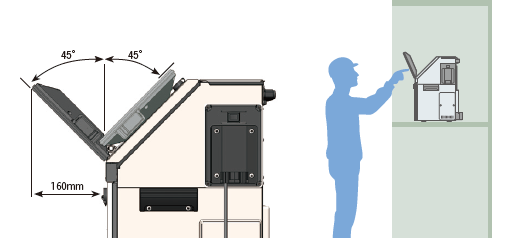

- Some models are not compatible with optional features.Please contact us for more information.
Dimensions

Other Product Lines


Inquiries
Click the links below to make inquiries about products, request a quotation, and download catalogs. Please feel free to consult with us.

